Labels

3d (2) arts (1) cad (1) Career (1) Computers (30) Education (2) Gadget Reviews (31) Gadgets (30) Google (4) Internet (9) Java (1) Job (1) Mobile (11) music (1) others (6) rap (1) Sketchup (1) software (12) Tablets (26) Tech News (39) Technology (36) Themes (1) Tips-Tricks (4) video (1) Windows (4)

Friday, January 27, 2012

NEW iPhone 5 - coming October 2012


NEW iPhone 5 

The sixth generation of Apple's vaunted iPhone—the iPhone 5—is expected to arrive in Apple stores worldwide in October 2012, approximately one year after the launch of the iPhone 4S. Google's Android, nipping at its heels for years, is expected to overtake Apple's iPhone in market share this year, putting Apple on the defensive. If there ever were a time for the iPhone to woo and wow potential buyers, now would be it. The iPhone 5 should continue the biennial pattern of issuing a major overhaul the year after a more evolutionary model, like the 3GS and 4S.

With every new iteration, the questions on everyone's mind are:
1.What's new? (What are the new added features?)
2.What does it look like?
3.When does it come out exactly?

Launch date change: Apple is reputedly trying to make the iPhone more attractive as a holiday gift item, so has begun in 2011 to launch the new iPhone in the fall, as it has done with the iPhone 4S. A fairly new iPhone is hot and not impossible to buy in late November or December, and will have not been upstaged by the latest Android phone by then. Expect October launches for iPhone from 2011 onwards.

While there is some speculation that the iPhone 5 might be available in the first half of 2012, that is unlikely. The popularity of the 4S suggests that Apple doesn't need to shorten the lifecycle of the iPhone just yet, and there is some speculation that the iPhone 5 might be released on October 5, in commemoration of Steve Jobs, who passed away on this day in 2011.

So far, Apple's been characteristically mum on the details on all future unannounced products, but the rumor mill and fake pictures are already starting to spring up.
Here's what we can probably expect:
4G: The iPhone 4 and 4S are belatedly available on Verizon in the United States (and the latter on Sprint), but 4G (LTE) is likely not going to be available until AT&T releases its own 4G service (HSPA+) nationwide, expected in later 2011 at the earliest. The iPhone 5, released in 2012, will likely be the first 4G iPhone available on all three US carriers (AT&T, Verizon, and Sprint). This is, admittedly, a disappointment for Verizon users, since its speedy LTE network will have been deployed for well over a year and accessible with competitive (read: Android) devices during that time.
Edge-to-edge, larger screen. The entire front face of the iPhone might be a screen, doing away with the physical home button, or possibly integrating it into the display itself. Rumors suggest the screen will grow from 3.5 inches to 4 inches.

Wireless charging. Removing the need for a port-cable connection for charging, the iPhone 5 might employ inductive charging, where the iPhone is placed on a charge mat and the phone battery is charged by induction. You can easily imagine buying mats for your desk, car, and elsewhere where your iPhone is typically lying around losing its charge. Since iOS 5 enabled data sharing over the air, inductive charging might allow the iPhone to finally ditch cords altogether.
Faster chip. With each successive Apple mobile operating system, increased complexity and added features create strains on the processor. Apple is likely to move away from working with Samsung, with whom it has a number of outstanding patent lawsuits underway, and move to an updated, quad-core A6 chip, which the iPhone 5 will share with the iPad 3. The A6 is likely to be produced by Taiwan Semiconductor Manufacturing Company (TSMC) and tested/packaged by Siliconware Precision Industries (SPIL), both based in Taiwan. The A6 offers performance and energy usage improvements over the A5, using a more advanced 28-nanometer fabrication process, over the A5's 40-nanometer process.
Polysilicon (p-Si) touchscreen mounted on Gorilla Glass. The Japanese newspaper, Nikkan, has reported a rumor that the 2012 iPhone will switch to a new display material that will enable it to be thinner, lighter, and less power-intensive than current displays. If even the last claim is accurate, that will be a major boon to battery life, since a phone's display is typically the largest draw on power. This display technologically will putatively be manufactured by Sharp, starting the spring of 2012 ahead of the phone's summer launch.
Gorilla Glass, a Corning innovation, resists breakage far better than any other commercially-available glass. Coupled with the p-Si touchscreen, the iPhone 5 will likely be the brightest- and toughest-screened
iPhone yet.

More memory. The iPhone app store shows no signs of abating in popularity, and without SD card memory expansion in Android phones, Apple will up the phone storage options available. Expect 64GB and 128GB variants.

Improved battery. The iPhone 5 might be the first to use the organic radical battery (ORB) technology developed by Japan's NEC, which is more environmentally-friendly than current lithium ion batteries that have dangerous heavy metals. ORB also boasts an absurdly fast recharge time (about 30 seconds) and higher energy density (will be able to pack more power into a smaller battery).

Better camera. The iPhone 5 might be the first iPhone to cross the 10 million pixel threshold with its camera (the iPhone 4S boasts an 8 MP camera), unsurprising as high-resolution images have always been a hallmark of Apple's products.

Near-Field Communication (NFC) chip. Debuted on the Samsung Nexus S and possibly implemented on the iPhone in the 5th generation product, this newest hardware addition enables contactless communication between a phone and objects similarly embedded NFC capabilities. This should eventually enable things like paying via credit card by holding your phone over a terminal for a second, or paying for things from vending machines using your phone. The technology is similar to Bluetooth although it uses less energy and establishes a connection far more quickly (although at a much closer range - a few inches away instead of yards away).
The most compelling reason for not installing an NFC chip is that the technology has really been Google's bailiwick, since adoption of the technology at POS (point of sale) retail terminals has been pushed by Google Wallet. Apple might strategically choose to lag here.

Form factor improvements. Apple puts a tremendous amount of emphasis on the sleekness of its products. The iPhone 5 will be no exception, with a modern, lightweight, and thin look. Expect some surprises in terms of shape and, especially, materials, as Apple hopes to push the envelope and fend off attacks from Android handmakers, its largest competition.

Case material improvements. To round out the environmental friendliness of the new device, more advanced, naturally-sourced plastics might be used in the case. For example, isoplast polymers might replace the previously used polycarbonate case manufactured with BPA (bisphenol-A). The glass back used in the iPhone 4 has had too many breakage issues, although Gorilla Glass would make the glass far less fragile.

Improved antenna design. After the fiasco of the iPhone 4's wraparound metal antenna, Apple has to make some ground in reception in its new overhaul. This has been addressed somewhat by iOS 5 already, which purports to choose between two sets of antenna based on the strength of the signal. But for the 2012 iPhone, expect a new antenna that doesn't require a special case or on-the-fly antenna selection to avoid "death grip" interference. This will probably be a benefit that Apple will not make a whole lot of fuss about, since it would only draw attention to the iPhone 4's serious shortcoming, and because it was supposedly addressed via iOS 5.

Possible innovations and features

Apple usually includes something unique and technologically cutting-edge into each iteration of the iPhone (like the smudge-proof screen in the 3G and glass case in the iPhone 4 and 4S). Here are some long-shot possibilities for the iPhone in 2012:
the case could be made of the battery itself (lithium ion polymer), reducing weight and improving battery life
the button could be phased out, replaced with a virtual button on-screen
face or thumb recognition as a security measure
the phone could be a Wifi hub using the carrier 4G connection
a "pico-projector" - video can be projected a short distance onto a flat surface
a clear "window phone" in which the phone could be transparent

What do we know so far?
Toshiba Mobile Display Company is building a $1.2 billion factory to produce LCD panels for the iPhone 5. The factory is scheduled to be operational in the second half of 2011, ready to produce iPhone 5 displays for the 2012 launch.
A consortium of three Japanese display manufacturers - Toshiba, Hitachi, and Sony - are merging their mobile display businesses in early 2012. They are reportedly working on a 4-inch (10.1 cm) display that is rumored to be used in the iPhone 5.

Monday, January 23, 2012

How to Recover Data From a Broken Hard Drive


If you are reading this article you are probably desperate, but before you panic let me tell you that there is hope, and there is probably more hope than you think…. Even if your hard drive has an internal mechanical malfunction, data can be recovered without having to send the hard drive to a data recovery service. Yes! you heard right, I’m sure you have come across articles that will tell you how to recover data from a damaged partition, you will find a ton of those on the web, but when your hard drive starts malfunctioning none of those articles are going to help you solve your problem, This article will.
Corrupted file system
If the hard drive gets detected by Windows and can be accessed but you do not see any data inside, or you get a message saying that the drive needs to be formatted. You probably have a corrupted file system in you hands.The solution for this is a good file recovery software. I’ve tried many, and my choice is “Recover My Files” from GetData. Many of the recovery suites out there claim that they can recover data and they probably can, but can they find everything that you want to recover? Most likely not! This software can. But don’t take my word for it, download the free version from their website and give it a try, you will see what I’m talking about. The free version is a demo so it will not allow full functionality but, it will let you see what it can recover and will even let you recover some small files. 
The software does have its drawbacks. If your file type is not on their list it basically can’t be recovered. If you want to recover a file with an uncommon extension that is not on their list you are out of luck. Their list is extensive though. Make sure you run the “complete File Search” and not the Fast, as the later is basically worthless. The complete will give you more than you need, even stuff that you erased from your hard drive years ago. It will take a long time depending on the size of the hard drive. The program will not allow you to install it on the same hard drive where the data needs to be recovered from for obvious reasons. So be prepared to install the software on a secondary drive like a USB Flash Drive or External Hard Drive. There are also a free alternatives which work as well or even better than “Recover My Files”.
Clicking noise of death
If your hard drive is making the common “clung… clung… clung…” sound your head are having trouble reading the contents of the drive. This is one of the worst problems you can have since the arm of the drive is not functioning properly and therefore cannot read the disks inside. As some of you might know this is not repairable, at least not at home, Hard drives need to be opened in dust free environments, and by specialized personnel, so do not even attempt to open it if you want your data back!!!. Many people will just give up at this point and send hard drive to a data recovery service. However, before you do that and spend an arm and a leg, there is something you can do. 

Hard drive does not get detected
If the computer does not detect the hard drive, or the computer just does not want to turn on when the hard drive is connected to it, you might have a bad hard drive board. This is the big circuit board located at the bottom of your drive. These easily replaceable boards tend to get damaged over time due to the heat generated by the hard drive itself. I will tell you how to replace this board with the following solution:
There are a number of places on the web that will sell you these boards. If you can’t find it or you are a cheap bastard you can always resort to eBay and buy a used hard drive with the same model number as yours, remove the board from the used drive, and use it on broken one. This will probably cost you less than purchasing the board alone. If your hard drive is old it makes more sense to buy another hard drive, on the other hand if the hard drive is new you are better off buying the board. These boards run around $50 each. If you decide to purchase another hard drive or the board alone, make sure you are getting the exact same board! I cannot stress this enough. You can have drives with the same brands and specifications with slight variations on their board and consequently on their firmware, if this is the case the board will not work, so make sure you are getting exactly what you need before pressing that “buy now” button!

Hard drive gets detected but still does not work
If Windows detects the hard drive but it can’t be accessed, won’t give you the option to format it, or its properties. You probably have dirty contacts on your board. Usually when this happens you do not hear the famous “clicking noise of death” noise, but rather a repetitive “rrrrrr rrrrrr” sound, as if the hard drive is reading the same data over and over, or you do not hear any sound at all. It is important to mention that this behavior does involve the computer detecting the drive but DOES NOT involve the “clicking noise of death”. To solve this problem try the following: Remove the main board from the bottom of the hard drive and clean the bottom contacts. That board that you see underneath the drive is actually sitting on top of un-soldered contacts. Many Hard Drives operate at high temperatures, and this tends to melt the circuit board’s coating. When this happens this coating will spill over these contacts, and since they are not soldered their dirty metal surfaces will no longer touch. To solve this, remove the screws from the board and flip it. You will see a row of contacts usually in more than one location. Rub the surface of the contacts with a pencil eraser, just as if you were erasing something you wrote. This will actually clean those contacts better than any other method. Screw the board back in place and try it. (If your hard drive happens to have pin connectors rather than flat ones, disregard this tip and buy a new board.)

Clicking noise of death (Last Resort Solution)
This trick will actually work 60% of the cases, so you do have a good probability of getting your data back. I have to warn you that after freezing your hard drive there is also a good chance that the hard drive won’t work ever again, therefore this procedure should only be attempted as a very last resort.
1 – Place the Hard Drive inside a Zip Lock bag and put it in the freezer for about 2 hours.
2 – After that take it out and connect it to the computer as fast as you can so that it does not have time to warm up. Make sure that you do not remove the hard drive out of the bag and that you open it as little as possible when connecting it to the power and data cables, so that outside air doesn’t come in and create condensation on the drive.
3 - Turn your computer on, look for your data and take it out as fast as you possibly can. Time is key here because you do not know if that drive is going to ever work again. Make sure you do this on a fast computer that does not take to long to boot up, if possible connect the hard drive to an external USB enclosure so that you do not waste time with the computer booting up. Also make sure you know the exact location of your data; is better if you go to straight to the folder rather than using Windows search utility, as searching the drive will heat it up faster due to the amount of work the arm will have to make. Drives usually work for a few minutes and stop working once they heat up. So hurry!!!
4 – If after freezing the hard drive and connecting it to the computer you are still not able to access it and you still hear the noise, hold the drive in your hand and, without taking it out of the bag, tap it with your knuckles on one side to see if this releases the heads, you obviously have to do this while the hard drive is powered on and connected to the computer.

Final Thoughts
If none of these tips work for you and you still want your data back is time to send your drive to a data recovery service, there are number of those on the web, I have never actually tried one, but some of them will charge you a flat fee regardless of the problem. However, these services will not guarantee your back all of the time, in fact most of them regardless of what they claim, will just have a 75% to 80% success rate. There are some things you just can’t recover from, like an arm scratching the whole surface of a plate. Best thing is to back up your data regularly. 

Friday, January 20, 2012

How to Recover Unallocated Drive Space

Unbeknown to most users, there is usually a portion of hard drive space that is not allocated to the active partition and sits on the hard drive unallocated and unused for any purpose. This drive space can be anywhere from a few megabytes to up to a couple of gigabytes in size. Reclaiming this drive space for use by the system is an easy task that any computer user can perform to gain full use of the hard drive.


Instructions

    • 1
      Click the "Start" and then "Run" buttons within the Windows desktop to produce a text box for entering run commands.
    • 2
      Type "compmgmt.msc /s" (without quotation marks) into the resulting text box. This will start the Windows computer management utility.
    • 3
      Click the "Disk Management" link in the left-most frame within the program window. This will start the virtual disk service that will allow you to view disk partitions and adjust them accordingly.
    • 4
      Right-click the drive whose partition you wish to extend over the unallocated space. This will produce a standard Windows context menu.
    • 5
      Left-click the "Extend Volume..." heading within the context menu. This will start the extend volume wizard.
    • 6
      Click the "Next" button on the Extend Volume wizard's welcome screen.
    • 7
      Select the disk whose partition you wish to extend from the left pane of the wizard and click the add button in the center of the wizard's program window.
    • 8
      Enter the amount of unallocated space you would like to add to the partition at the bottom of the program window. The maximum amount available on the disk to extend the partition by will be listed near the bottom portion of the window for reference.
    • 9
      Click the "Next" button to begin the extension process. This will only take a few moments, depending on the size of your hard drive.
    • 10
      Click the "Finish" button when prompted by the wizard to complete the recovery of your unallocated hard drive space. You may begin using it immediately; no reboot is required for this process.

Monday, January 9, 2012

Windows 8 Features & Release Date


Windows, being one of the most used OS, brings great challenges for Microsoft to keep its users impressed in the next version of Windows.


Although Windows 7 has done exceptionally well since its release, Microsoft has been constantly working to make the next version of Windows a better one by further improving upon the existing features, and have added new impressive Windows 8 features along with a stunning UI.
Microsoft released the early version of Windows 8 on a prototype tablet last week. Those of you who would like to taste and experience the all new Windows 8, you can download the Developer Preview, which is currently in pre-beta version. The developer version shows off the current stage of the OS. It is available for free download, and comes in three different packages:
  • (1) 64-bit version – Only the OS
  • (2) 32-bit version – Only the OS
  • (3) 64-bit version with developer tools

Windows 8 Features

Windows 8 offers a number of new Windows 8 features from its all new UI to Windows App Store and improvised security features. Here’s a list of new features and improvements which will arrive with Windows 8:

Support for both x86 PCs and ARM tablets

Windows 8 is the first edition of Windows which will work on both ARM based tablets and traditional x86 (as well as x32 and x64) PCs based on ARM processors from Intel and AMD.
“Support for ARM-based chipsets, touch, and sensors makes Windows 8 work beautifully on your choice of a full spectrum of devices, such as 10-inch slates with all-day battery life, ultra-lightweight laptops, and powerful all-in-ones with 27-inch high-definition screens,” Microsoft contends, in a Windows 8 Guide distributed with Windows Developer Preview

Windows To Go

The “Windows To Go” seems to be an exciting feature that basically allows Windows 8 to boot from a USB device (called as Live USB), including user’s programs, settings and files. The feature is designed to work with both USB 2.0 and USB 3.0, and on both legacy NIOS and UDFI firmware. However, Microsoft says that a user will not be able to “Hibernate” with this feature.
Windows 8“Windows To Go is a new feature in Windows 8 that enables enterprise administrators to create USB drives containing complete, managed Windows images that users can use to boot and run Windows on any Windows 7 or Windows 8 capable computer. Windows To Go makes it possible for employees to use a managed device whether they work from home, a client office or in a free seating environment. This session will discuss Windows To Go, its hardware requirements and building compatible and complementary software.”
Another interesting thing about this feature is that, if the USB drive is removed, Windows will automatically freeze, but will continue to operate if the USB drive is inserted back in the next 60 seconds after removal.

Windows Store

To compete with Apple, Windows has confirmed the introduction of a Windows Store, similar to Mac App Store, which allows users to browse through Windows applications, while developers can publish their Metro-style apps on Windows 8 devices.
Few days back, Microsoft gave a strategic view of its app store, and gave a quick demo on how it works. Microsoft revealed that the Windows App Store will be the only place where users can access the Metro-styled apps. Here’s a quick demo that shows how users will be able to buy their apps:


Windows 8 User Interface

Speaking about the UI, Windows 8 certainly has got a mind blowing interactive UI, which has been extensively redesigned to a “Metro-style” design, which shows the most important information to you, embodies simplicity, and gives you full control over it. The UI is designed to provide a fluid and intuitive interaction and navigation with touch, or a mouse and keyboard.
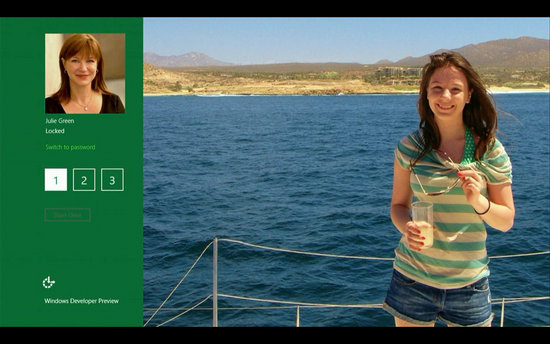
Julie Larson-Green, Corporate Vice President, Windows who stated: “Everything that’s great about Windows 7, is better in Windows 8,” gave a quick hands on look at the Windows 8 user-interface. Here are some of the screenshots she released:
Windows Logon Screen – Unlike the traditional way of entering a password to unlock the screen, Windows 8 can be unlocked by just tapping on the right areas of the screen.


Windows 8 Features

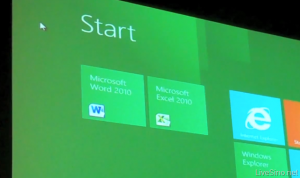
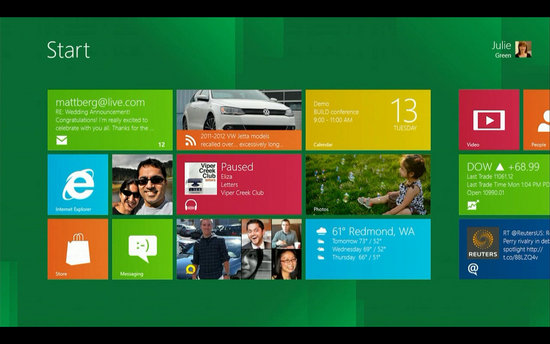
Windows 8 Start Screen – The Start screen is yet another impressive UI. The screen basically groups all your applications together, which you can easily drag and drop, or add new things.


Windows 8 Start Screen

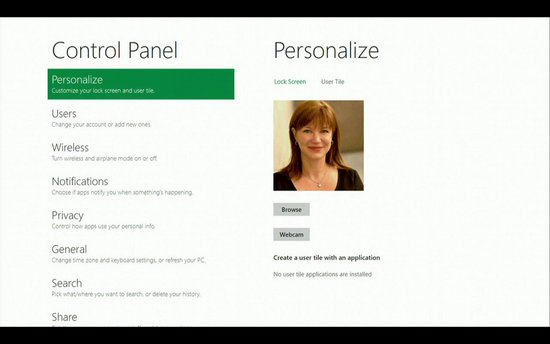
Control Panel


Windows 8 Release Date

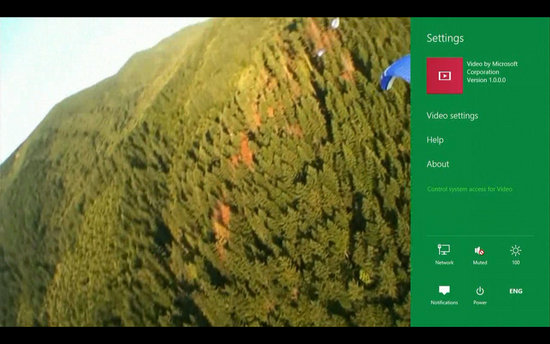
Playing Videos in Windows 8


Windows 8

Windows 8 Task Manager


Improved Windows Defender

The Windows Defender which was first released with Windows Vista is getting a security upgrade with the upcoming Windows 8. This would probably edge-our third-party antivirus and anti-malware programs. Windows Defender will become a full-fledged anti-malware solution for Windows 8. This will include protection against all types of malware such as virus, worms, trojans and rootkits.
In addition to that, Windows Defender will provide real-time detection and protection from malware threats using a file system filter, and will interface with Windows secured boot, which is another security feature.

Internet Explorer 10

The developer preview of Windows 8 comes with a Metro version of Internet Explore (IE) 10. Since it is a preview version, it does not support any browser plugins and extension – including Adobe Flash and Microsoft Silverlight. However, it will feature full screen browsing mode by default, implements several new HTML5 capabilities, turbocharges HTML5 performance, and adds some security options for Web applications.

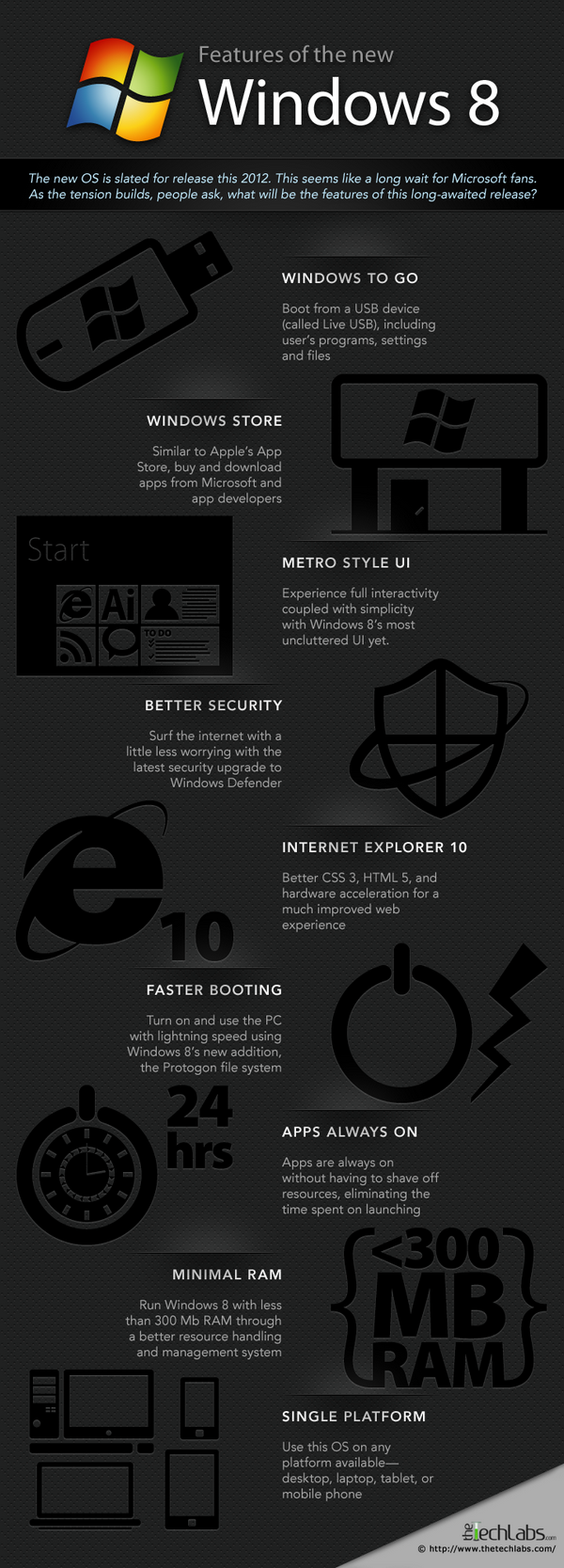
Windows 8 Mock Illustration (You Can Embed This)


Windows 8 Illustration

You may use this infographic on your site as long as you do
not remove the link back to the post. Here is the embed code:


Windows 8 Minimum System Requirements

It is reported that Windows 8 is expected to have the same system requirements as Windows 7, and will run on existing PCs/laptops that run Windows 7. Here are the following minimum system requirements to run Windows 8:
Processor: 1GHz or faster 32-bit or 64-bit processor
RAM: 1GB (32-bit) or 2GB (64-bit)
HD Space: 16GB for 32-bit (or 20GB for 64-bit)

Windows 8 Release Date

We can expect Windows 8 to be launched sometime in mid-late 2012, however, it’s too early to predict the Windows 8 release date, since it is still under development. Nevertheless, the only question that haunts each and every one of us – Will Windows 8 win the battle against Apple which it had lost several years back?

Nokia 1 Windows 8 Slick Tablet Concept – Is it the Nokia’s next boost up!


we have already seen both the 
Nokia N9 as well as the Nokia Lumia 800 and both of the handsets are brought up with a slick design along with an impressive touchy look but you must have a glance at the Nokia 1 tablet concept which has been made up by ‘Yronimus’. Yronimus is a designer from Deviant Art and by taking some of the clues from Nokia Lumia 800 he has impressed it into a larger screen. It just looks great and this concept is undoubtedly one of the best among the good looking tablets that we’ve ever seen if not the best. As per the rumored information Nokia is planning to come out with a Windows 8 tablet in the present year 2012. This tablet resembles the Nokia Lumia 800 design but comparatively it is much slimmer and it keeps the hold of the monoblock design. You can have a glance at its further information ahead.
nokia 1 concept tablet


The Nokia 1 concept tablet by Yronimus and the device has been inspired by the Nokia Lumia 800 and easily pass off as the Nokia N9 too but for a change its a larger version. So what should we expect as the configurations looking at for the Nokia 1 concept tablet? As a starter the device would bear an 11.6” AMOLED full touch display having 1280 × 800 pixels of display resolution and it will be equipped with the dual-cameras as a 5 Megapixel primary camera with full 1080p HD Video Recording at 30 FPS. It will also carry a 2 megapixel front facing secondary camera which will facilitate you for the video conferencing.
nokia 1 concept tab
In addition this tab will be stuffed with a 2GB of RAM and will be coming either in a 32GB storage version or a 64GB storage capacity. This concept device will feature the Windows 8 ARM Edition Operating System and it will be empowered with a 7500 mAH Battery to ensure you a continuous huge battery backup without any interruption. It is 8.5mm thin and measures for a dimension of 187.6 x 293 x 8.5mm and weighing 580 grams. So, what about your thought? Is it credible? We can just say that if this innovated device looks anything like this then surely it is going to be a winner.

Windows 8: How it Will Work With Cloud Computing


Windows 8 is the next sensible step towards cloud computing while giving users options on how they want to do that. Windows 8 is taking a more responsible approach than compared with Google Chrome, for example.
We have all heard about cloud computing for some time. There has been little to show us it has been coming for some time. Except until very recently. Google has just released the Chromebook, which runs on Google Chrome, which more than an operating system, it is a browser. Windows 8 works a little differently, and may be a more appropriate use for many of us. Most of us are probably not ready for a full switch to cloud computing without additional options, such as keeping our own items on our own computer. Windows 8 is a move towards cloud computing without compromising what we know. Here is a look at how it will work in terms of cloud computing.
Windows 8 Logo Windows 8: How it Will Work With Cloud Computing
  • Azure.The Windows Azure Platform is the computing platform used by Microsoft to offer cloud computing products. These products are and will be offered separately to the Windows 8 download. You can think of the Azure Platform as the huge computer that handles a software program for you, and when you are using it, you are using it through the network. A perfect example of this is Office 365, the replacement for Microsoft Office. You will not have the program on your computer, you will use it like the program on your computer, but it is stored on the Azure network.
  • System Integration.Windows 8 will allow you to use application on the internet, cloud computing applications, with the full power of your operating system and computer. Currently, when you are using an application on the internet, Facebook is an excellent example of one of them, you are only able to use the power of your browser and the power that can be given to that application by your operating system. The whole power of your computer will be available for online applications, and therefore, there will be considerable speed changes.
  • Cluster Support.It is important to understand that when you get services from cloud based products provided by Microsoft, it is not like you will be getting them from one single source. There are many technologies around the delivery of information and services, which deliver from multiple sources at a single time. This means if one of those sources crashes, you will not lose your data, and the service will not be terminated.
  • Windows Live.Windows Live services are expected to grow dramatically, offer a variety of products, and increase to include large storage with monthly payment plans. Similar products are already available for business at very low cost when compared with competitors for a long time.
  • Device storage.Even though there will be a large amount of cloud services available after the release of Windows 8, the best thing about the change is that we will still retain our on-device storage. Not everyone is ready to store everything online – as is the case with owning a Chromebook. A staged transfer of the way we use computers is what most people will want. We still want the choice. While Windows 8 will function very well with cloud computing, is a system that integrates the language of cloud, it still gives us the option of storing on our own devices.
Windows 8 will be an exciting and hassle free step forward in the right direction for computer users who have put up with having to learn how to use different devices because they all operated differently, and who live in a world where they fear getting online because of security issues.

Incredible Gadgets You Would Kill For – 20 Examples


Gadgets are more unusual and more clever than normal technological objects and that makes them gain popularity. These wonderful gizmos ease our daily routine and keep us in contact with the innovative movement, making sure we don’t get stuck in the past. But of course, in the world of gadgets there are also some devices that take it a little bit far, making us gaze at them with hope that we will get our hands on them sooner.

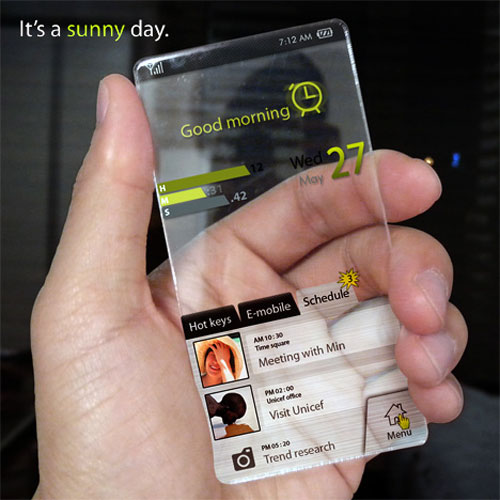
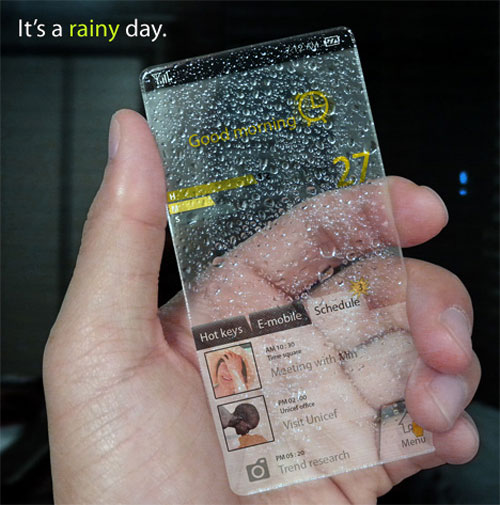
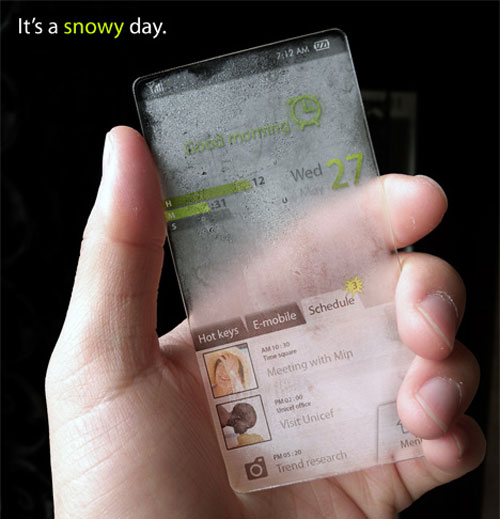
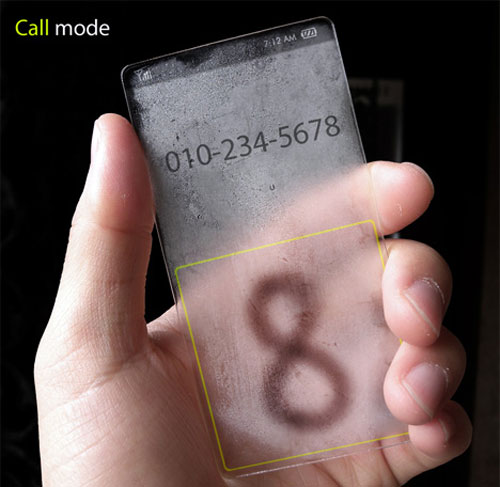
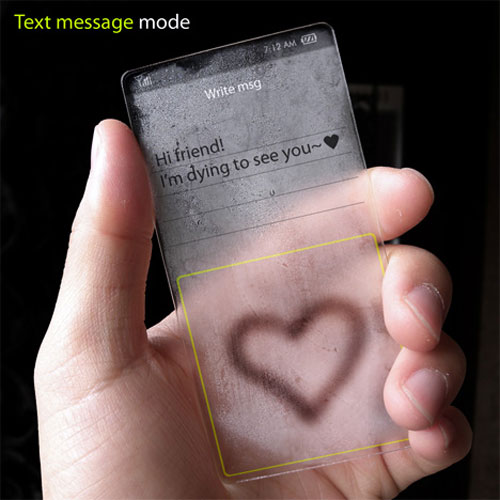
Window phone concept

Is it a window, is it a phone? No. Actually, it’s Window phone and this is the part where you are saying “Whaaat? What are you talking about?”. The phone is actually a concept with extraordinary features. Surely if this could be actually put into production, it would set a new standard for the term “cool”.
Window phone concept 1

Window phone concept 2
Window phone concept 3
Window phone concept 4
Window phone concept 5

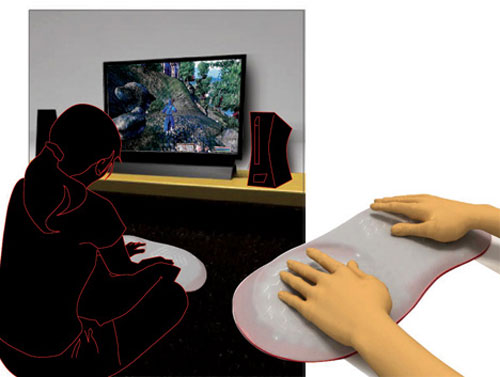
AFGT Gaming Device

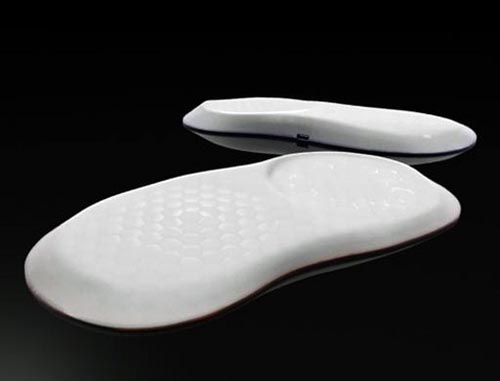
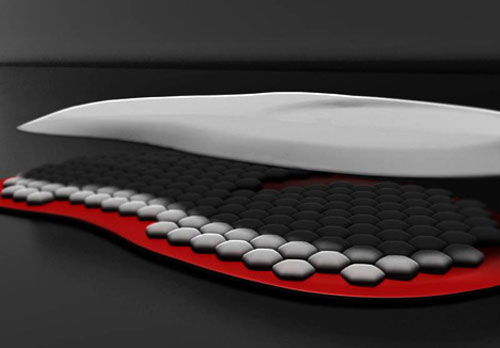
This gadget seems to be the holy grail of the gaming world. Its interesting feature is the tactile feedback that is used to enhance the gaming experience. This very interesting gadget is made out of touch sensitive silicon, to be more specific, silicon air pockets, each with a pressure generator.
AFGT Gaming Device 1
AFGT Gaming Device 3
AFGT Gaming Device 2

Sound Mug Speaker

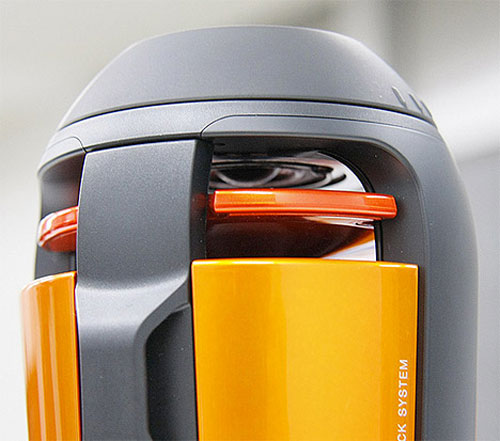
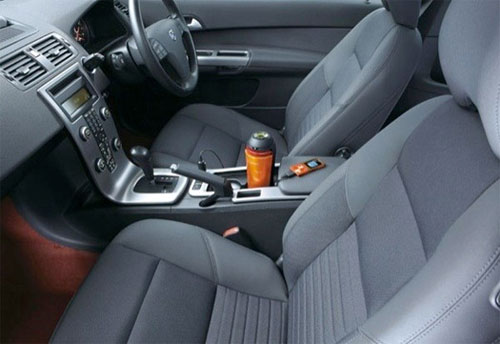
This particular device could look a little bit strange at a first impression but actually it’s a damn cool thing. The crazy looking speaker can fit in your car’s cupholder and don’t worry about batteries, the gadget is powered by car’s accessory socket.
Sound Mug Speaker 1
Sound Mug Speaker 2

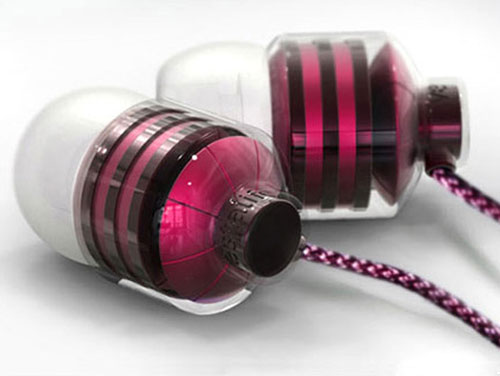
Vestalife BumbleBee Earbuds

If you’re a guy, it’s unlikely that you will be interested in these little pink earbuds but as a girl, you’ll find them pretty glamy.
Vestalife BumbleBee Earbuds

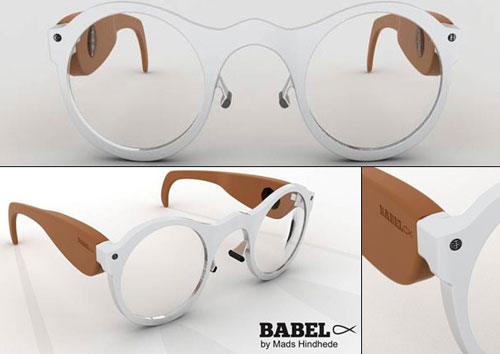
Babelfisk

In case you’re getting lazy in classes these wonderful glasses will give you some help. They have two microphones that can be directed to where someone is speaking and you have text and audio recorded into a flash drive.
Speech to Text Glasses

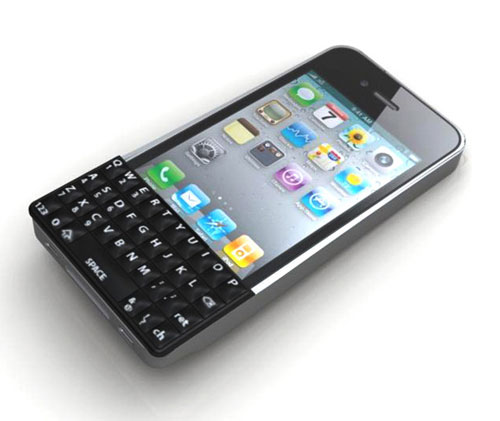
QWERTY Keyboard For iPhone

Surely, this sounds like a dream come true. The Iphone is everywhere and probably a lot of you have it encountered the typing problem. With this tiny little qwerty keyboard you can type fast and accurately.
QWERTY Keyboard For iPhone

Sliding Pooltable

Sliding Pooltable

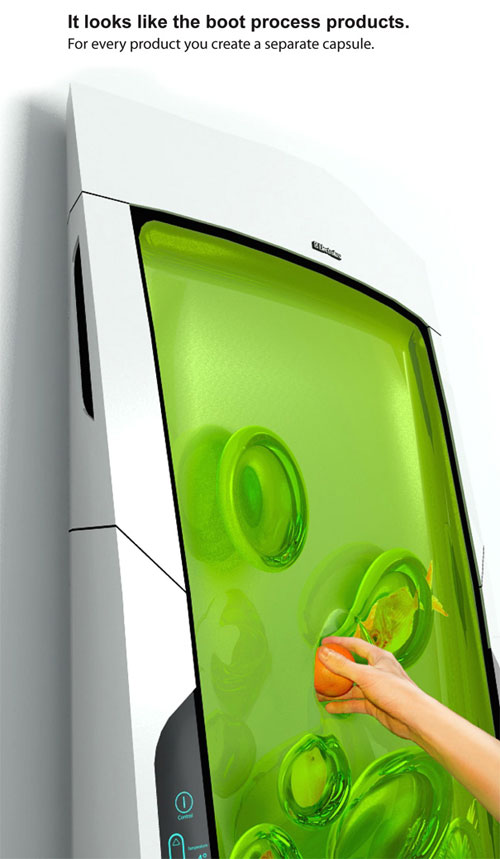
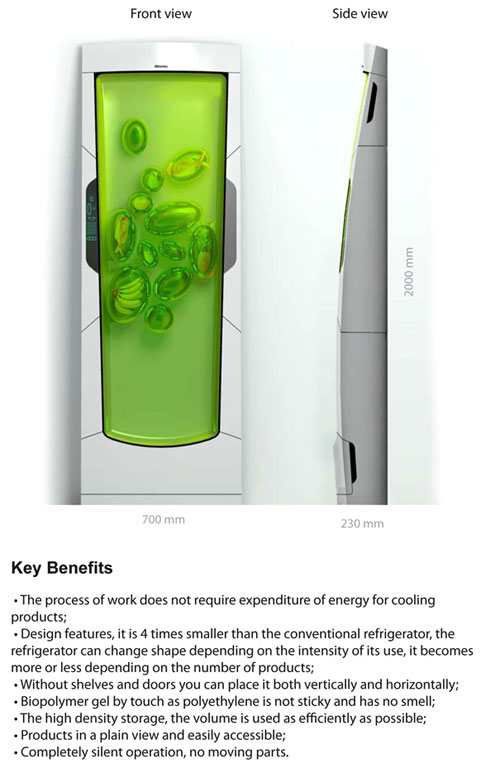
Bio Robot Refrigerator

The Bio Robot fridge cools biopolymer gel through luminescence. It might look stinky and sticky but it’s actually an odorless gel that envelopes the food.
Bio Robot Refrigerator 1
Bio Robot Refrigerator 2

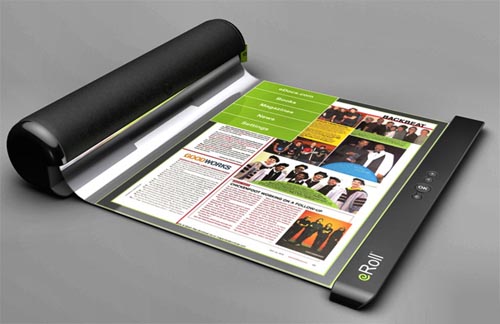
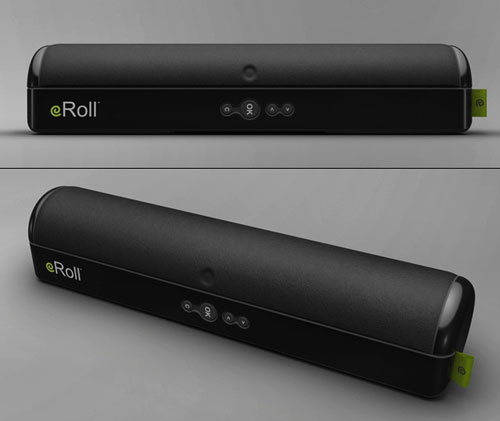
eRoll

eRoll could be the future of e-reading, along with iPad and another gadget that will be presented in this article. If you don’t want it to read ebooks on it, you can use it as a self defense weapon.
eRoll
eRoll 1

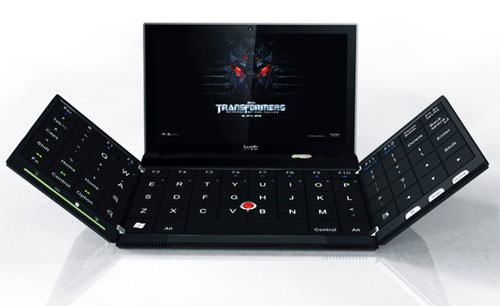
Folding-out Laptop

The Transformers wallpaper on this laptop says it all. This laptop transforms into a mega-laptop as soon as you unfold its keyboard.
Folding-out Laptop

MU SPACE

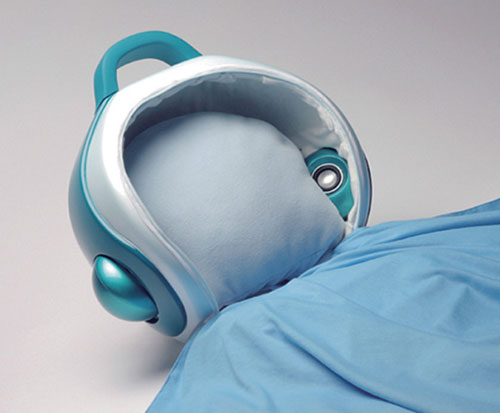
Listening music in bed with your headbuds in your ears can be really annoying and it appears that Yuan-Hao Hsu and Lin Tzu Hsuan have figured that one out. The result consists in a mp3 player pillow that will help you relax when taking your nap.
MU SPACE

Wind circle

This will surely start a lot of discussions with your house guests but besides that it will also cool the air in the room. Yeah, it does that too…
Wind circle

Bracelet phone

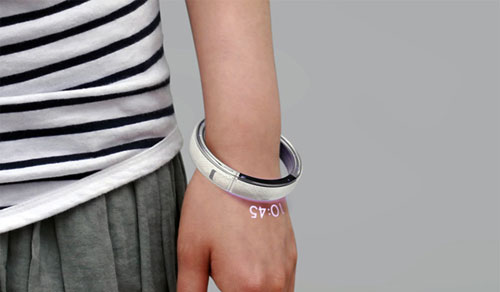
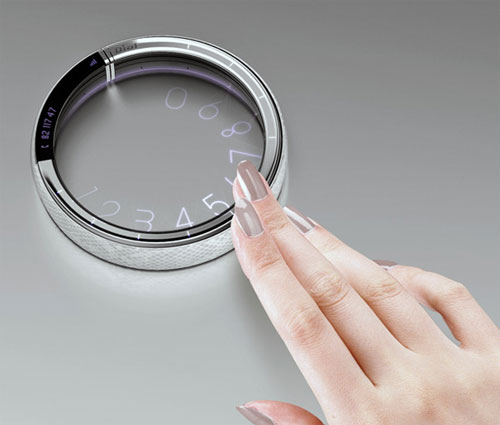
Concept phones are becoming very popular these days. The stranger their shape is, the more popular they get. Probably that’s why this bracelet phone got so many fans or because it has a round dialer on it, like in old land phones.
Phone bracelet
Phone bracelet 2

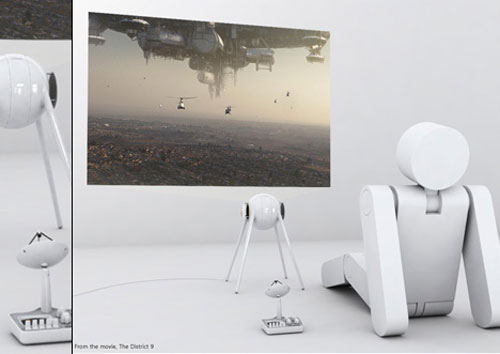
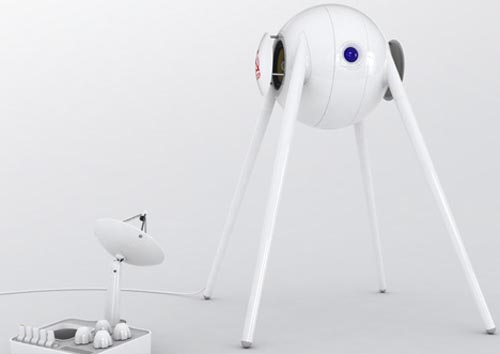
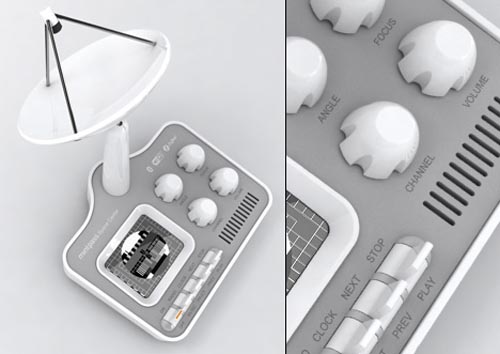
Mint Sputnik projector

Sputnik like projector
Sputnik like projector 2
Sputnik like projector 3

Portable Interactive Display

This device should be interesting especially for architects or industrial designers because of its interesting features. Its software can take CAD drawings and display them on the surface where they can be manipulated easily.

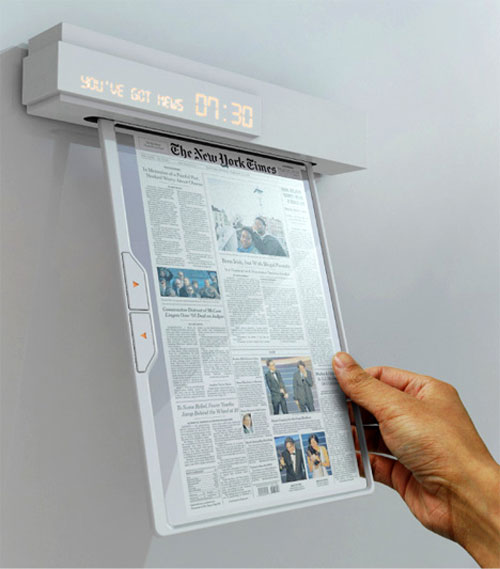
Newspaper of the future

Nowadays people try to find alternatives to using paper and they come up with interesting solutions. We already saw the eRoll in this article and tablets like iPad are made in a lot of variations today but Seon-Keun Park and Byung-Min Woo came with a different idea.
Phone bracelet 1

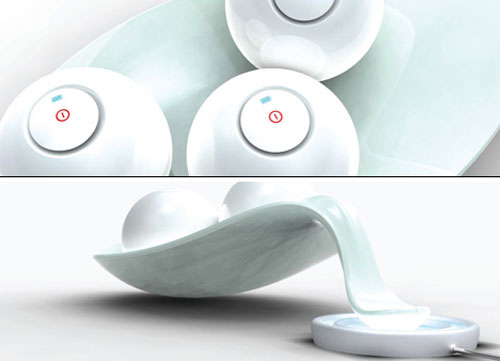
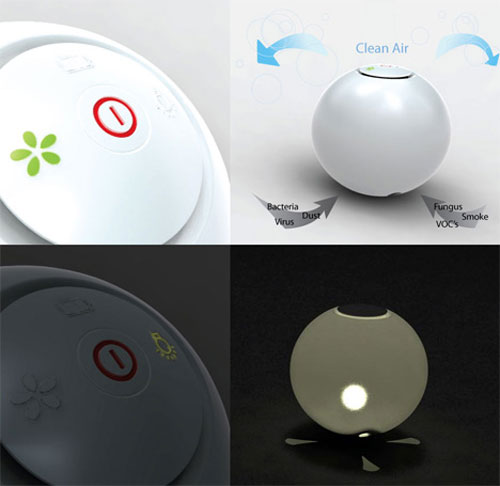
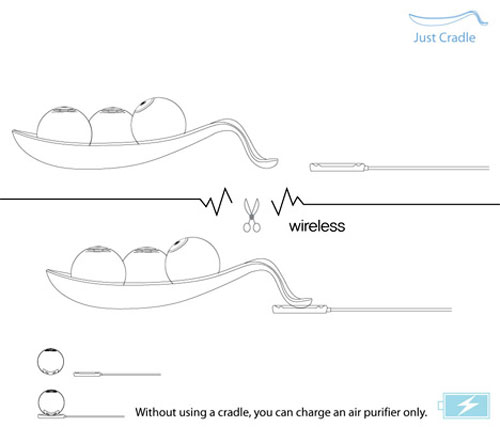
Air Clean Balls

Enough with the serious talking, let’s talk about balls (…?!). They have a funny name but an interesting feature, they can clean the air in the room by using a form of ionization with a photocatalyst complex sterilizing. It is interesting that it doesn’t freshen the air as you would probably think, but it actually cleans it, removing bacterias and viruses too, besides strange odors.
Air Clean Balls 1
Air Clean Balls 2
Air Clean Balls 3

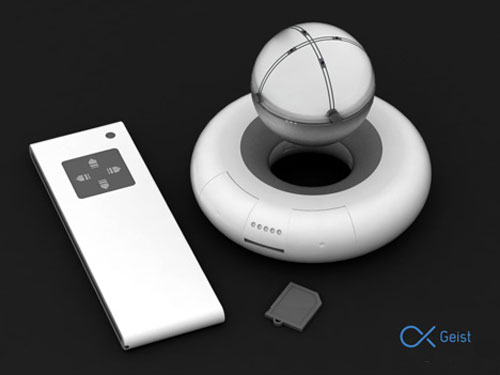
Geist Projector

We’ll keep on going with the balls issue but this time it’s about a projector. The mobility of the projected image is given by the levitating ball that sustains itself in the air with the help of electromagnetism.
Geist Projector 1
Geist Projector 2

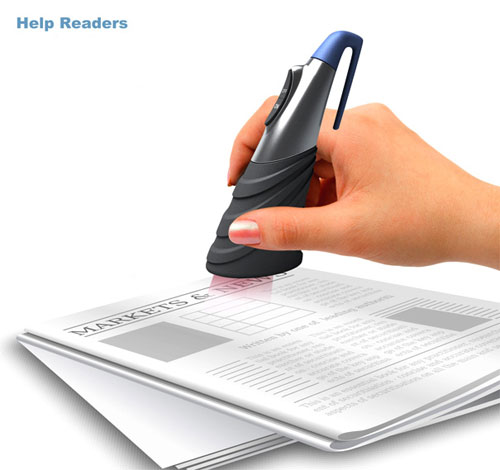
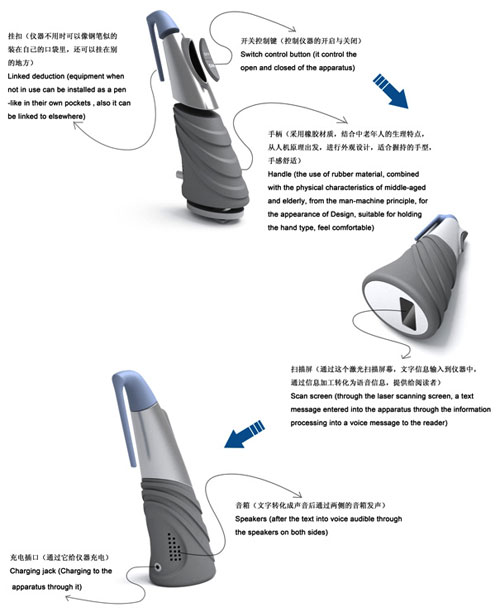
Help Readers device

This device converts text to audio, helping you in case you have eye problems or because you’re infected with the laziness virus. in
Help Readers device 1
Help Readers device 2

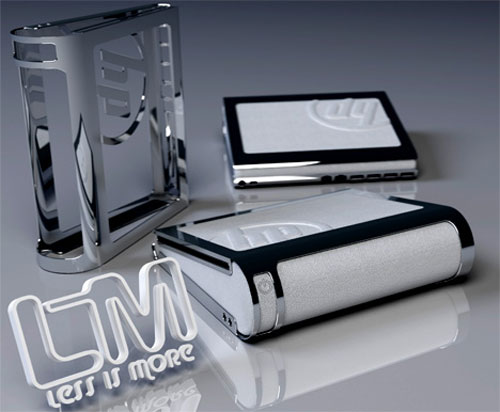
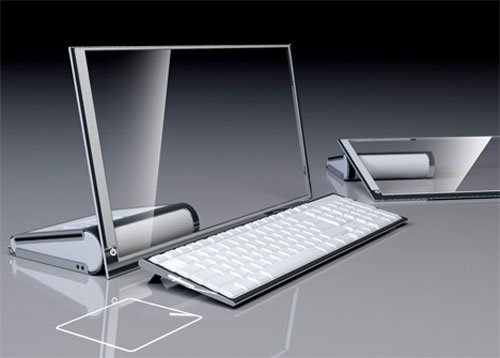
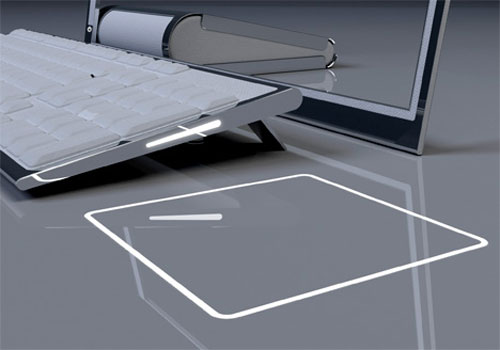
HP LIM Glass computer

The HP LiM (Less is More) concept is set to feature a 19″ transparent touch OLED screen along with a wireless keyboard. The touch screen slides down to create a more ergonomic touch experience and easy navigation.
HP LIM 1
HP LIM 2
HP LIM 3
Related Posts Plugin for WordPress, Blogger...